
The project office ready to run
A complete methodology for portfolio, predictive and agile projects. Every process drawn in BPMN 2.0, every document already templated in Word, PDF and Excel.

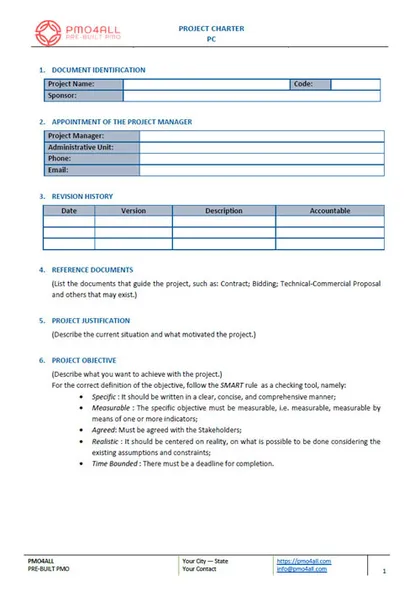
Three situations, one kit.
The new PMO lead
You received the mandate to create the project office and there is no methodology to start from.
The PMO without a standard
Each project is documented differently and the portfolio has no entry or priority criteria.
The project consultant
You implement PMOs for clients. The purchase allows you to use and adapt the kit in your consulting engagements.
Three parts of one methodology.
Methodology guide
18 chapters: concepts, 13 roles, RACI, indicators and the criteria to classify, categorize and prioritize demands.
Process flows
Nine processes in BPMN 2.0. Edit them in Bizagi Modeler or publish the HTML version on the intranet.
Templates and spreadsheets
From the demand request to lessons learned, plus the project measurement spreadsheet.
The methodology is the slowest part of creating a PMO.
- Roles, flows and templates already agree with each other.
- Portfolio, predictive and agile share one vocabulary.
- Every file stays editable for your context.
| Component | Written from zero | With PMO4ALL |
|---|---|---|
| Methodology guide | Drafted and reviewed internally | 18 chapters to adapt |
| Process flows | Modeled process by process | 9 flows in BPMN 2.0 |
| Templates | Designed one by one | 12+ ready to fill |
| Portfolio criteria | Negotiated without a reference | Entry, category, priority |
| Agile projects | Separate method | Same guide, chapter 15 |
Nine processes, in the order they run.
Identify projects
The single entry for operational and project demands. The criteria decide what becomes a project.
Categorize and prioritize
Classifies each project and ranks it against the strategic plan, with published criteria.
Control the portfolio
Tracks progress through performance measurement and risk analysis across all projects.
Start the project
Formalizes the initiation and assigns the project manager and the initial resources.
Plan the project
Groups the planning activities and produces the project management plan.
Execute the project
Runs the planned work under the leadership of the project manager.
Monitor and control
Continuous control with status reports and change requests.
Close the phase or project
Issues the delivery and acceptance terms, the closure report and the lessons learned.
Manage the agile project
For dynamic scope: canvas planning, sprints, Scrum artifacts and roles, time-boxes and planning poker.
Know your level before you implement.
The Maturity Lab diagnosis places the organization on a five-level scale and lists the gaps by dimension. Run it again after PMO4ALL and compare the two cycles.
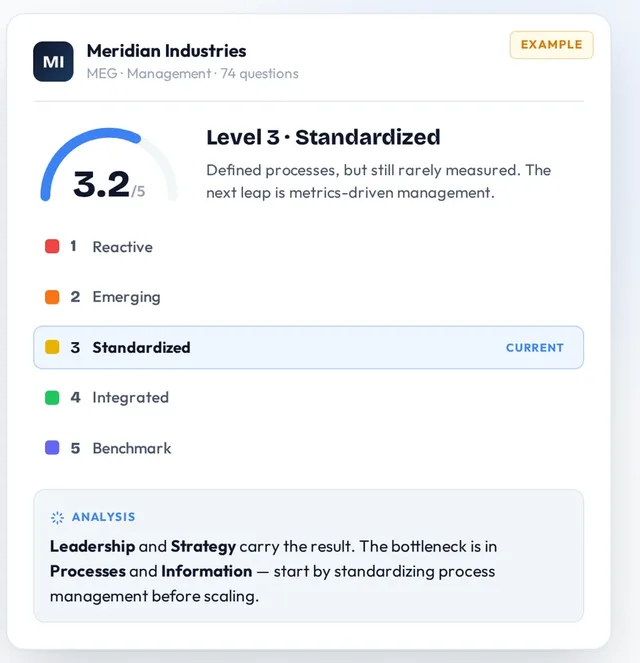
Measure
Run the free diagnosis and get the baseline level.
Maturity LabImplement
Adopt the guide, publish the flows and use the templates.
PMO4ALL kitMeasure again
Repeat the diagnosis on the same model and compare cycles.
Maturity LabEighteen chapters, one table of contents.
- Introduction
- Objectives and duties of the PMO
- Concepts
- Roles and responsibilities
- Responsibility matrix, RACI
- Performance indicators
- Operation or project demand
- Criteria to categorize projects
- Criteria to prioritize projects
- Project size and required documents
- Documentation rules
- Support tools
- Portfolio management techniques
- Project management techniques
- Agile techniques
- BPM notation
- Methodology macroprocess
- Glossary and acronyms
Eleven editions, ten languages.

Written by a practitioner who implements PMOs.
Frederico Ribeiro Ramos has worked for more than 25 years in governance, strategy, processes and projects, in public and private organizations. PMO4ALL packages the methodology he applies in PMO implementations. He also created the Maturity Lab.
Start free. Buy the kit once.
Maturity Lab diagnosis
- 3 diagnoses, no credit card, no expiry
- Level from 1 to 5, gaps by dimension
- Action plan with owner and deadline
PMO4ALL kit, English edition
- Guide in Word and PDF, 18 chapters
- Portfolio, predictive, agile
- 9 BPMN 2.0 flows, Bizagi and HTML
- 12+ templates, Word and PDF
- Excel spreadsheets
- Use with your consulting clients
Before you buy.
Which file formats come in the kit?
The methodology guide and the templates come in Word and PDF. Some tools come as Excel spreadsheets. The process flows come as a Bizagi BPMN file and as an HTML export.
Can I use the kit with my consulting clients?
Yes. The purchase allows you to use and adapt PMO4ALL in your own consulting engagements.
Can I edit the process flows?
Yes. Open the BPMN file in Bizagi Modeler, adjust lanes, tasks and gateways, and export a new HTML version.
Which standards does it follow?
The methodology aligns with the PMBOK® Guide and with PRINCE2®, and uses Scrum for agile projects.
Does it cover agile projects?
Yes. The agile model covers canvas planning, sprints, Scrum artifacts and roles, time-boxes and planning poker.
Which edition should I buy?
Buy the edition in the language of the team that will use it. There are 11 editions in 10 languages.